Flag This Hub

Virgin Mobile's LG Optimus V 3G Connection Problems - Try This Easy Fix

By


Bummer! You just got the fancy new LG Optimus V from Virgin Mobile and now it seems the service is kaput. Not so (in most cases). Just like with your laptop or desktop computer, sometimes there is just a minor something that goes haywire for an unknown reason. The usual solution is just to find a way to reset it. 

I am going to share with you an easy fix to 3G data connection problems that works most of the time when I stop being able to surf the web, get my email, and download apps (aka, all of the fun stuff). 

Keep in mind that there are times when nothing can be done because it is the network that has gone down. I have the advantage of having two Virgin Mobile phones in my household that both have current service, and I can always check if it is a network outage by seeing if both phones are having the same problem at the same time. If they are, then it is probably the network and not the phone. 

If one is having the problem, however, and the other is not, then the problem probably is with the handset. 
Ready for This?

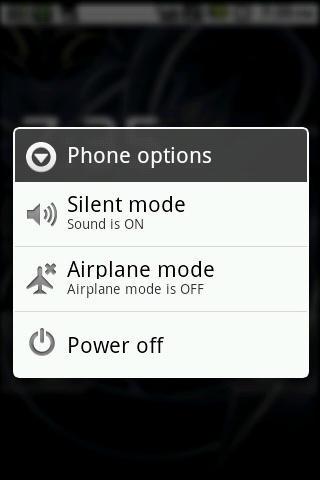
The easy fix to the LG Optimus V 3G connection problems is as simple as putting the phone in to "Airplane mode", letting it sit for a few seconds, and then turning "Airplaine mode" back off. 

This simple routine will turn off the cellular networking completely and consequenty reset it when turned back on from scratch. It is like a total hard reset for the data and cell connections. 

Try it - I've had almost 100% success with it doing it just once. Sometimes, you may need to try the process twice. If it takes more than twice, there is probably something else going on. 

Do you have any other tricks up your sleeve? Leave them in the comments!

Get Involved!

Sign up @Hubpages

Facebook Me!

Follow Me @Twitter

Subscribe to my @Youtube Channel

Find me @ Rock That LG Optimus 
Comments

krispy 4 weeks ago

Thank you, thank you Salty! Finally tried the phone activation trick and my phone is back in business.

Bilal 3 months ago

@Troubled

You are the man!!!

I didnt follow the order but it sure jump started the 3G. I think it was the activation process, because i had done all the other things before too. THANKS A LOT. Virgin people have NO CLUE.

hockeyfreak908 3 months ago

If nothing else works try going to the dialer and:

1. type in *#*#4636#*#* (do not push dial)

2. a new screen should've appeared. click on phone info.

3. go down to where you can set your preferred network typ and set it to CDMA auto (PRL) and this should solve your problems!

~~Helper~~ 3 months ago

I had 3g problem on my Optimus v and i tried as

he/she "Troubled" said and my phone start getting 3g and

i am very thankful to "Troubled".

danatheteacher 4 months ago

@idomayr, well, you can try the "reactivation" process here: http://motorolatriumph.info/2011/07/fix-previously

As a last resort, you can call Virgin Mobile if this doesn't work, and after a bit of a time investment, they usually can fix the problem by walking you through various things on your phone.

ldormayr 4 months ago

im having a problem with my 3g on the optimus v as well. ive tryed everything to get it to work like putting it into airplane mode, disabling and enabling the 3g, and even a factory reset. Nothing works. ive gone to best buy to have them take a look at it and they couldnt figure it out either. please help!!

Jd268 4 months ago

Thanks for all the great tips. I tried them all including a call to VM when I first lost service:

They checked my service

Pull out battery while phone is on, then depress the power button for 15 sec, then reinstall the battery. (Nothing)

They explained that it could be trouble with the network. Wife has same phone with 3G service standing right next to me.

The only thing that worked was the reactivacte phone.

moiman64 5 months ago

Salty's solution above worked like a charm!

Troubled 5 months ago

I tried the activation 1..2..3.. fix but it didn't work. So I then tried the airplane fix..Nothing...So I turned off the wifi and then tried the airplane and it has worked ever since. I don't know what to say.

salty 8 months ago

if you have this well documented problem, and no matter how many times you do airplane mode or turn data off or whatever and it still doesn't work, the all you need to do is go to the settings>about phone and click the activation, it will do the 1...2...3... thing and then it will tell you there was an error, exit out and you should have your 3G back. I haven't had data for days on 3G and no matter how many times I did the airplane thing, battery thing, reboot thing, all the things, nothing helped, I did the activation trick, and it worked instantly.

Andy 8 months ago

Everytime I turn on mobile data it shuts back off. Is there anyway I can fix this?

Alice 8 months ago

It helps. Yes, the VM customer service says to take the battery off & reset it. It usually works, But it's troublesome, they reply in 72 hours.

jose 8 months ago

i yurn on my phone it shows the virgen mobile sign then it shows the andriod sign then it freezes there

Virgin Mobile USA 8 months ago

Hello Everyone, If the steps above did not work with your Optimus V phone, please feel free to email the Social Media Team at vmusocialcare@sprint.com for more troubleshooting assistance. ^AR

m367 10 months ago

I was going to settings-wireless&networks-mobile networks-data enabled, uncheck. I will try airplane mode in the future as it does not seem to work half the time. VM customer service says turn it off and remove battery.

danatheteacher 12 months ago

@graphicartist21, I did that at first, but I had less success with it. Doing the full disconnect seems to make a difference.

graphicartist21 12 months ago

Using quick settings ( an app i picked up from your hub) go down to mobile data turn it off wait a second then turn it back on. Does basically the same thing but you don't disconnect from your phone service.

Submit a Comment
Members and Guests

Sign in or sign up and post using a hubpages account.


    Like this Hub?
    Please wait working