How to Get Free Ringtones and Message Tones for the Virgin Mobile LG Rumor Touch- Step by Step

Welcome to LG Rumor Touch Hack Central @Hubpages.
Chances are that this is the first of my many Hubpage's articles on the LG Rumor Touch (which you may have through Virgin Mobile or through Sprint) that you have visited.
Ringtones are essential to making your phone your own, but its hard to swallow paying $2-$3 per song when you can buy an entire song on Itunes for $1.
I can teach you how to get any ringtones or SMS tones you want in a few steps. I assume you do not know much about this phone or about tech, and please feel free to ask questions in the comments. I try to get back to any questions within a day.
Sometimes community members pick up my slack and help out as well with answering questions. I encourage you to look through the comment archives and see if your question has already been asked and answered.
When you are done here, please feel free to learn about installing apps and games at some of my other hubs.
Enjoy your new phone!
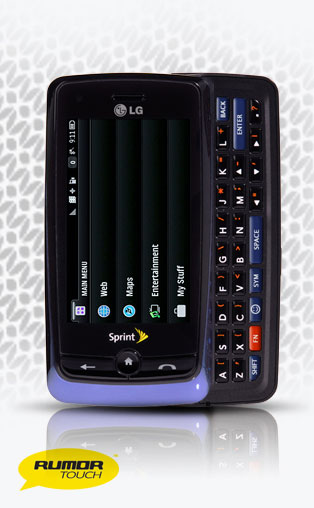
LG Rumor Touch (Sprint or Virgin Mobile)
Step One to "Ringtone Freedom"
- Get your phone equipped with a microSD card.
- Hook phone to computer with USB cable.
- Create a folder in the microSD storage labeled something like "Free Sprint Ringtones" or "Free Virgin Mobile Ringtones" or just "Ringtones" (can be accessed through "My Computer").
- Create a temporary folder on your desktop labeled something like " Free Ringtones", which is where we will put the finished products of this process until we transfer them to your phone.
Audiko Up Close
Click thumbnail to view full-size

Step Two to "Ringtone Freedom"
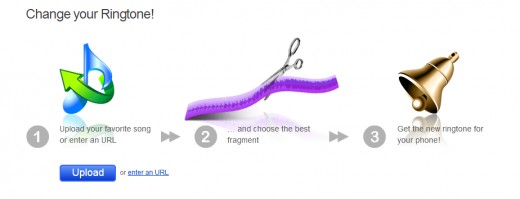
- Visit the website Audiko - It is completely FREE - No hidden "catch" (so far, so good)
- I recommend creating an account so that you can save a library of your free Virgin Mobile or Sprint ringtones.
- Audiko is stellar for your Sprint or Virgin Mobile ringtones for two reasons:
- First-You can upload any of your own mp3 music from your computer/phone/other storage devices and use their super easy (compared to other's out there) ringtone creator.
- If you have an account, the ringtone will be saved. Otherwise it's a one time shot. MAKE SURE that you download the non-Iphone version (which translates into the .mp3 version) and make sure you download it to your COMPUTER (remember that temporary folder we made in "Step One" on the desktop). Iphone ringtones will not work!
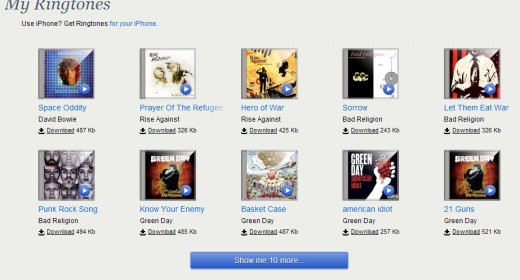
- Second-You can search their entire library of popular free music ringtones and download them (if you do not have an account) or save them to your account library to download now or later.
- Our ultimate goal, however, is to get some tester ringtones downloaded to our temporary "Free Ringtones" folder on the desktop.
- Pick three already made free ringtones and try making say, one or two of your own from your mp3 music using their ringtone creator.
Step Four to "Ringtone Freedom"
- Now, the next step is CRUCIAL. We will rename the ringtone file extensions from ".mp3" to ".3g2"
- IMPORTANT: Your computer will throw a fit. Ignore it!
- ADVANCED NOTE: For those of you who are grumbling to yourself about having to rename each mp3 ringtone file one by one, I recommend downloading "File Renamer Basic". I use it, and it works fast and easy. Of course, it is also free!
Your Sprint or Virgin Mobile LG Rumor Touch is almost to "Ringtone Freedom". Read On!
Step Five to "Ringtone Freedom"
- We are on the home stretch-Hang in there!
- On the computer, go to "My Computer" and navigate to the "Mass Storage" device (aka, our microSD card) to bring up the folder "Ringtones" (see "Step One") we made earlier.
- Drag and Drop the renamed free ringtone files from the desktop folder to the folder on the microSD card.
- When the transfer is finished, you may close all the windows and disconnect your phone from the PC.
Step Six to "Ringtone Freedom" (Last One)
- At this point, I assume that you have knowledge of how to navigate the various features and settings of the LG Rumor Touch (Sprint or Virgin Mobile).
- On your phone, access "Mass Storage"---->"File Manager"------->"Your Ringtone Folder"
- Once in your "Ringtone" folder, our first step is to TEST that the phone will play the ringtone, which by the way, the phone reads as a "Video Ringtone".
- Press one of your finished tones and try to play it. If it plays, we are in business. If not, something went wrong and you may want to repeat this process until you get a file that does play.
- Assuming that the tone played, <----arrow back to the regular file manager list of your finished tones. Select MORE in the bottom right corner, and from that list, select COPY MULTIPLE. Press (my phone highlights them in red) any that you want to test (one is enough for the first go).
- Select COPY TO IN PHONE from the bottom left of the screen once you've decided which tone to try first. Unfortunately, the phone renames the file when it moves it from the microSD card to the phone memory. If it copies fine, then move on to the next steps. If not, try another one of your testers, and if they also do not copy, you may need to go back through the process again.
- Now that we've copied our ringtone to our phone, it may be assigned from the category "My Videos" when choosing a unique tone for a contact or when setting ringer settings for the whole phone.
- IMPORTANT NOTE: If you decide that you want to delete a tone you've copied to your phone for space reasons, go to PHOTOS + VIDEOS------>MY PHOTOS + VIDEOS-----.IN PHONE------>VIEW----->MEDIA FILTER------->Videos. You can delete from here. You may also rename files here too (remember the phone changes the original file name when copied....)
Ringer Size Limit Update
At the request of comments, the file size limit for free Virgin Mobile and Sprint ringtones or message tone seems to be 500kb. Please keep this in mind while following this tutorial.
"Message Tones" UPDATE
Thanks to comments left by Samuel and YouTube's MentalNinja1004 , the mystery of how to use and download mp3 ringtones as message tones and not just as free ringtones has been solved!!
Please see "Directions for Message Tones" at the end of this hub.
- TAKE NOTE:
The "Message Tones" also work as free Virgin Mobile or Sprint ringtones.
For some people, the qcp tones are the preferred free Virgin Mobile or Sprint ringtone format because it leaves open the option to assign a picture to a contact and have that come up when they ring.
If you use the 3g2 format, it will replace the contact photo for the ring only (as you will still be able to see the photo in the contacts list) because it is a "video ringtone".
Directions for MESSAGE TONES
Thanks to readers, we have solved this problem as well.
You can use mp3 ringtones as message tones (and ringtones) by doing the following:
- Rename mp3 ringtones with the file extension .qcp, and as with .3g2, ignore the Window's error messages.
- Attach this .qcp file in an email message and send to YOURNUMBER@vmpix.com
- Wait patiently for at least five minutes. If it does not come, send with a different email provider (for example, if you send with Juno, try with Gmail).
- Eventually, you will receive an email message with a "voice memo" attached.
- It gives you the option to save this voice memo to your "voice memo" folders (but they do not end up there and will erase any voice memos you have...you must restart your phone before it will allow you to record voice memos again-so don't do it!).
- What you want to do is press the voice memo and select "set as ringer"-Once assigned to anything, the ring is stored in the "my audio" menu for future assigning in the ringer settings menu. REMEMBER-do not SAVE! It doesn't work. You must assign it to something to save it, but you do not have to keep it assigned to keep it in the My Audio folder for future assigning in the Ringer Settings menu.
- Troubleshooting: 1) Try a different email service 2) Make the file smaller. These two things should solve most problems.
- NOTES: I used gmail and the Thunderbird Email Client. When I tried the Windows Live Desktop Email Client, it did not go through.
Your Sprint or Virgin Mobile LG Rumor Touch now has full "ringtone freedom".
If it worked, which email service did you use?
If the message tone process worked, pick the one that most closely matches your situation.
When it work, I used:
When it worked, which client did you use:
Other Ringtone Download Locations!
- Zedge.net
Huge selection of free ringtones, themes, wallpapers and games for mobile phones. 5.5 million items shared by more than 18 million Zedge users world-wide. No charges and no subscriptions, and easy to download.
Congratulations!!!
ENJOY your "Ringtone Freedom"
I've been working on making free Virgin Mobile and Sprint ringtones work for the LG Rumor Touch.
Virgin Mobile wants you to use only their ringtones, apps, etc. Their ringtones are way way way too expensive. Just don't do it!
This is probably what allows them to offer such inexpensive quality service, however, but the hacker in me sees it as a challenge.
Sprint ringtones for free are just as scarce.
I hope you have similar success beating "the system".
Power to the People!
Virgin Mobile and Sprint Ringtones' Freedom Forever!
Sign Up @Hubpages
Comment Easier and/or Publish Your Stuff
Get my Feeds: @LG Rumor Touch Hack Central @Techie Teachers @Tech Tonic @The Samsung Intercept Herd @I Own an LG Optimus V
Facebook Me!
Follow Me @Twitter
Subscribe to my @Youtube Channel
Related
How to Connect to Internet with Your BlackBerry without Paying For Data Plan
Choose Your Mobile Number – Globe!
How to Become a Cell Phone Tester Before They’re Released to the Public
How to Protect Yourself From Harmful Mobile Cell Phone RF-EMF Radiation

7 Awesome Mobile Phone Artists and Favorite Art Projects