Java Apps and Games on My Virgin Mobile LG Rumor Touch Mobile Phone-The Favs

Its a Miracle!
Not too long ago, the app outlook of my LG Rumor Touch was quite grim.
This is no longer the case.
I can now preach free ringtones, free third party apps, and other useful hacks.
This hub will look at some of the apps that made the cut, and I've put on my phone.
I've included photos as proof of this total AWESOMENESS!
(As to the "how" of putting apps on the Rumor Touch, you'll have to see my other hub on installing apps)
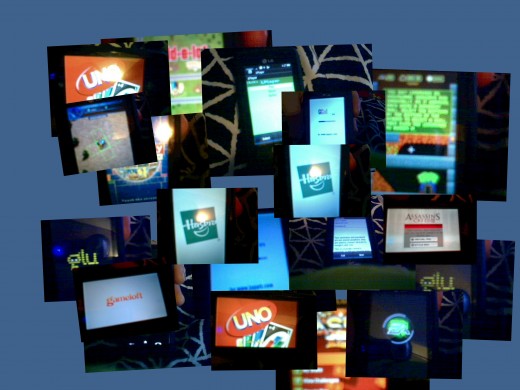
The non-virgin mobile apps installed on my phone!
- Google Sync
- Gcal
- Build-a-lot
- Assassin's Creed 2
- No Limit Casino
- Gold Rush
- Zuma
- Might and Magic II
- Command & Conquer 3
- The Settlers
- Texas HoldEm Poker
- SimCity Metropolis
- Lemmings Tribes
- Checkers Deluxe
- SPORE
- Tetris Pop
- Hero of Sparta
- Google Mail
- Weather
- BOLT browser
- LPlayer
- ToDoManager
- j2Wallet-Expenses Manager
- Books-Ebook Reader
- UNO
- RISK
- Midnight Poker
- Monopoly World
Favorites
If I had to choose my top three in software and my top three in games from the list above:
Software
- Google Mail-This is the official Gmail App. I LOVE that it has multi-account support!
- TTPod-Solves the problem of playing music in the background while doing other things on the phone.
- BOLT Browser-Stellar page rendering. Tabs. Neat Zoom feature. Web Apps installs. Its fun to have something different than Opera Mini or the native browser.
Games
- Monopoly World-Nice UI and cute animation. It's a great time killer.
- Zuma-I like the touch interface. Your finger takes the shots.
- UNO-Awesome interface and quick play. Colorful.
What About All the Phone Memory?
Surprisingly, I've only used 41% of my "In Phone" memory.
I also have all of Virgin Mobile's apps installed too:
- Contact Vault
- Google Maps
- MySpace
- Oper Mini
- Email +IM
The best way to free up "In Phone" memory is to relocate your photos/videos to your microSD every once and a while.
Other LG Rumor Touch Hubs
- J2ME .jar/.jad app download tool for the LG Rumor Touch (LG VM510)
MAJOR INFO! My FileConfusicator site got hacked, and was shut down by the free hosting provider. Rather than risk this happening again, I'm going to leave it dead. Sorry to all those of you who were using it the way it was intended :( ... - 18 months ago
- "Seekers" of LG Rumor Touch (Virgin Mobile or Sprint) Apps- My Ongoing List of Tested Games
Free touchscreen games to install on the LG Rumor Touch with Virgin Mobile or with Sprint. List of the best games and link to instructions to install. - 21 months ago
- How to Get Free Ringtones and Message Tones for the Virgin Mobile LG Rumor Touch- Step by Step
Your LG Rumor Touch from Virgin Mobile or Sprint can get free ringtones and message tones. Learn how to download and install them step by step. - 23 months ago
- How to Choose My App Folder-Games and Applications- on the LG Rumor Touch (Virgin Mobile and Sprint)
When you install apps and games on the LG Rumor Touch, they all go to one folder -- Applications. Learn how to put Games in the Games folder! - 21 months ago
- How to Download and Install Free Apps and Games on the LG Rumor Touch from Virgin Mobile
Install 3rd party apps on the LG Rumor Touch mobile phone from Virgin Mobile or Sprint. Find the perfect apps from my personal collection and get leads on other options for free and even get Angry Birds! - 22 months ago
Sign up @Hubpages
Comment Easier and/or Publish Your Stuff
Comments
@kierra, all of my apps and instructions are on this page: http://hubpages.com/hub/Install-Non-Virgin-Mobile-
where can i find the TTpod app that you have
I have recently procured a "Rumor Touch" a gift from VM for being a faithful customer for 10 years, you would think they would have given me their top of line phone. Anyway, i myself know how to use a phone and was semi-exicited when i got the new phone. Music, games, vidio, email and on and on. I even liked the opera mini browser but was disappointed when i could not download "FREE APs" i stumbled across your "Very informative" page here, however i myself (lets say not exactly a spring chicken) am not really computer savoy. My ex-husband, may he rot in hell, was and would have no problem following your advice. My question is: Can you explain it in laymen terms? Or can you guid me to a hackers help center?
@S, maybe something got corrupted, I would download the app again and reload it again on to your phone and see if that helps.
how do u red jad ebook on the rumor touch, i put both the jar and jad files on my phone and it says failed to download
#Fletcher, unfortunately that is probably as good are you are going to get with this phone for Foursquare. I promise I'll post about it if I ever discover anything different.
Thanks for reading!
The most common way @Jerryl is to connect your phone to the PC, open the microSD, and drag and drop the JAD/JAR files in to the APPS folder. If you do not have a PC, there are other ways. I have hubs on them as well.
The main hub on this topic is:
How do you make the jad jar files appear in the apps folder I'm new to this? I seen a video where there were 2 icons in the apps folder 1 jad 1 jar. How did they get their?
Hey there. I was wondering if you have found any .jar or .jad files for foursquare. I found one, but all it did was direct me to the mobile website that doesn't use the GPS. I find it weird that there isn't an app out for LG Rumor, but Google Maps uses the GPS. Thanks for your help. And I *love* this hub, by the way.
@Dana
Please find me a 240x400 (fullscreen) Peggle, and 240x400 Sims City Metropolis
please post a link for putting the above mentioned heroes of might and magic game. i would love to put it on my phone. thanks
@SCRABBLE Lovers-
http://www.mediafire.com/?5f4w82z2tazoxm4
Full Touchscreen support-best I've ever found for this phone. Fresh off the testing block! Enjoy!
Nevermind. After reading the PDF that came with this app there is no rename command????
I'd like to install a DOS app, but it says my file system must be JSR-75. I can't find out what it is???
Here's the app I want to install.
http://www.pc-freak.net/blog/dros-use-dos-like-com
The file manager in the phone won't let me rename/change file extensions so I wanted a dos app to do that.
Thanks
@John, you are correct. Just txt files. If you want to read EPUB, look at my hub on the Bookworm reader.
what formats does the ebook reader read?? i tried a few and all i can get it to read is .text files. it sure doesn't read .epub
Thank you for your help. I've been looking for a way to install MeBoy since I got this phone. (It's a Game Boy/Color java-based emulator.) Thanks to your guides, I've got a few Game Boy games working (slightly buggy, but it's due to the interface, and there's a simple workaround by activating the framerate counter) and am about to install some of the games from your link (the ones known to work on the Rumor Touch).
Thank you so much... This makes the phone 100 times better. (It was already great, between Sprint's wireless network being better than AT&T's in my experience so far and the plan).
@Kerbe, the built in PDF reader is the best I've found for this phone. It is truly not that bad. I have a hub on it.
I'm most looking forward to a PDF reader and version of Skype!
Hey, do you think you could point me to where I can find the Zuma and Spore files? Thanks! :)
Hello. I am about to receive my rumor touch that I won on eBay in a few days and am excited to use it. I'm looking forward to using your tips to get things going well on it. Thank you for providing them.
Do you know if the application called "Foursquare" will work on the rumor as well?
@Pam, the rumor 2 is a completely different phone than the one I have, BUT when this happens on my rumor touch, it is usually the product of the keyboard making the first letter of the password a capital by default. To avoid this, type a "space" first, then password, then go back and backspace the original space. This results in lowercase. It may be worth a try.
A good resource for the rumor 2 is HowardForums.com-check it out!
I'm having trouble syncing my facebook and gmail on my virgin mobile rumor 2. it keeps saying that I'm putting in the wrong user name and password.
Has anyone had any luck piggybacking to a laptop in a pinch?
Thanks
Just a little tip :) You can use the LG emulator to QUICKLY test if an application works or if it's worth installing on the phone. The emulator isn't perfect however. Here is an example where I'm running Google maps.
@Angel-Not initially. You need at least BlueFTP-I have a hub on how you can use this for ringtones and apps.
On the whole, however, you really need a usb connection (or a friend's connection) to get started and to have an easier go of it.
Is there a way to get these without having a usb for my phone?
@Michael, The whole media player thing is sort of a sore spot for Virgin Mobile users.
The best non native media player is the English TTpod player. LPlayer crashes a lot.
The on board media player does not do playlists. You can browse by artist/albums (but we aren't talking Ipod quality here). It will show album art while playing. It will not play in the background (however the buggy 3rd party apps all do....its really the dumbest/weirdest thing). If you get a text or call during the music, then you have the choice to answer it or continue listening to your music. Its either one or the other.
Like I said, its a sore point due to the no playlists/no background playing complications of the on board player. The 3rd party apps are not exactly totally designed to accomodate the Rumor Touch or the Rumor Touch's memory size.
However, the power of people trying everything under the sun led to us being able to install apps, and I have no doubt that the media player problem will continue to improve. Just this week has shown great leaps in the area with the discovery of TunesWiki and TTPod.
Hey its me again :)
How is the "LPlayer" app? I tried searching with Bing and Google, but couldn't find anything about it. Can you put your phone on "standby" while playing music? If you receive a call, will it interrupt the music? Can you browse by artists, playlist, and albums? Album art?
Thanks :)
@Thanks!, no. I remember having a hard time finding one that worked super well when I've had other phones that were supported ;( I'll keep my eye out though and will post it on my "Install" hub if I find one.
Any luck finding an email client for Exchange mail with ActiveSync capabilities?
@Billy, I'll post it in my mediafire folder. See "install non-virgin mobile..." hub for a link.
the website http://rumortouchapps.dual-servers.com/ is down. Does anyone know where I can get the Bolt Browser files? Ones I found did not work.
it worked!! thanks. i used JADmaker to get the JAD files.
@Emmanuella, I believe that the copy I have came from http://samsung-behold.servegame.com/behold/games.p
You will have to make a JAD file from the JAR. Use a program called Jadmaker-just drag and drop the JAR file in to it. This will create the JAD file automatically in the same folder as the JAR file.
If you still have trouble installing after creating the JAD file, you may need to fix the JAD file (I have a hub on this too).
This website gives you the option to download a JAD file, but they do not work.
I hope this helps-sorry that the search has been difficult.
Yes i checked but none of the zuma games i download worked well..they were not touchscreen..please can u give me the link to the exact one that worked for u...thanks!
@Emmanuella, check out my hub titled ""Seekers" of LG Rumor Touch (Virgin Mobile or Sprint) Apps- My Ongoing List of Tested Games"-the info on where to get it is in there.
where did u download your zuma?
@Ida and @help me, see my hub on installing 3rd party apps. I have two folders at mediafire and megaupload. Also there are links to other sites that have lots of apps!
Where did you get the Lplayer app??
where did u get your apps from???
Great stuff! Thanks.
Wow, it seems you really found high end technology phone? I really like to know about its security features and OS installed in it.
@K, see my other hub on installing java apps.
How do I see how to put the apps on my phone?
I really like the zuma app too its so awesome we can finally put apps on the touch
lieutenant 8 months ago
i need to install bolt.jar on my mobile, please tell me how can i install it?